
Someone fills in your form, and you reply at 10 p.m. because you were with clients all day. By then, they’ve already written to two other places, and there’s a good chance whoever answers first wins. Automated inquiry handling is built for exactly this: it replies the moment the form is submitted, keeps things organized, and lets you know.
What does automated inquiry handling do, and who is it worth it for?
Automated inquiry handling sends the person a personalized confirmation the moment they submit your form, saves the request to a spreadsheet, and notifies you. It’s worth it if you get several inquiries a week and go hours without seeing your email during the day. It doesn’t write quotes or give prices for you; you still do that yourself.
It isn’t worth it for everyone. In this article we’ll look at how it works step by step, what you shouldn’t hand over to it, what it costs, and how to decide whether you need it. If it turns out you don’t, that’s a good result too: you just saved HUF 90,000.
What automated inquiry handling is
Automated inquiry handling is a background process behind your website form. When someone fills it in, an automation platform (Make, for example) instantly sends them a confirmation, saves their details and notifies you. “Personalized” here means the email responds to the person’s actual question instead of sending a generic “thanks, we’ll be in touch soon.”
A basic form notification already comes free with WordPress. The table shows what automation adds on top.
| Aspect | Basic form notification | Automated inquiry handling |
|---|---|---|
| What the person gets | Nothing, or a generic “we got it” email | A confirmation that responds to their question, plus the next step |
| Where the data goes | Your inbox, mixed in with everything else | A spreadsheet or CRM, with a date |
| What you see | The raw form, in full | A short summary of the request when you check in |
| What if you forget | It slips down your inbox | It stays in the spreadsheet, marked as unanswered |
Why it matters who replies first
The most widely quoted data on response time comes from a 2011 Harvard Business Review article (Oldroyd, McElheran and Elkington). The authors analyzed 1.25 million inbound leads at 42 US companies. Companies that tried to contact a lead within an hour were nearly seven times as likely to have a meaningful conversation as those that tried even an hour later. Compared with companies that waited more than 24 hours, the advantage was more than sixtyfold.
In a separate test in the same article, 37% of companies responded within an hour, 23% never responded at all, and those that did respond within 30 days took 42 hours on average. In other words, being slow isn’t the exception; it’s the norm.
Two caveats, because I don’t want to mislead you. The research is American, it was done on larger companies, and it’s fifteen years old. On top of that, it measured real contact attempts, not automatic emails. A confirmation isn’t the same as a conversation. What it does give you: the person knows their request arrived, knows what happens next, and is less likely to also write to a fourth place. How many more bookings that brings you is something to measure, not promise.
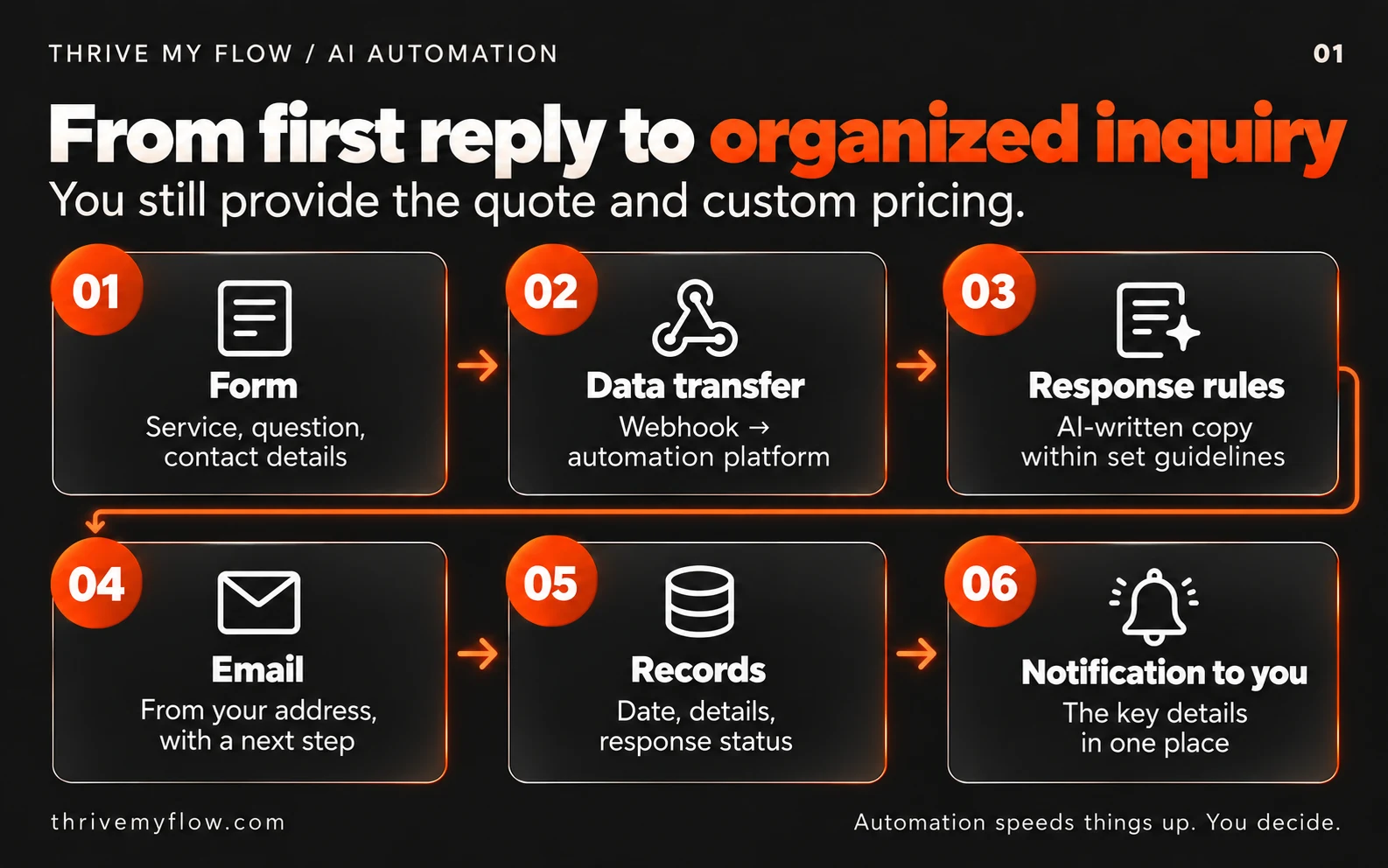
How automated inquiry handling works, step by step
Here’s what a typical setup looks like. The order of the steps is fixed; the tools can be swapped.
- Someone fills in the form. The structure of the fields matters: a service to choose, one open question, contact details and consent to data processing. If everything comes in through a single “Message” field, the automation has a harder time understanding it too.
- The form passes the data to the automation platform. With Make, this is a webhook: an address the form sends the fields to the moment it’s submitted.
- The AI writes the confirmation following your rules. The rules set the tone it can use, what it can say and what it can’t. This is where the no-go list goes: it doesn’t promise prices, appointments or guarantees.
- If the request doesn’t fit the rules (a complaint, a custom quote, something unusual), no AI text goes out. A neutral confirmation is sent instead, and the request gets flagged for you.
- The email comes from your own address, for example a mailbox on your domain, not a no-reply address. That way the person can simply reply to it.
- The details go into a spreadsheet (Google Sheets or a CRM) with a date and an “Answered” column.
- You get a notification with the gist of the request, so when you have time, you can reply already prepared.
- If you have an online booking system, the link is in the email, so the person isn’t left wondering.
Example: a bad and a good automatic reply
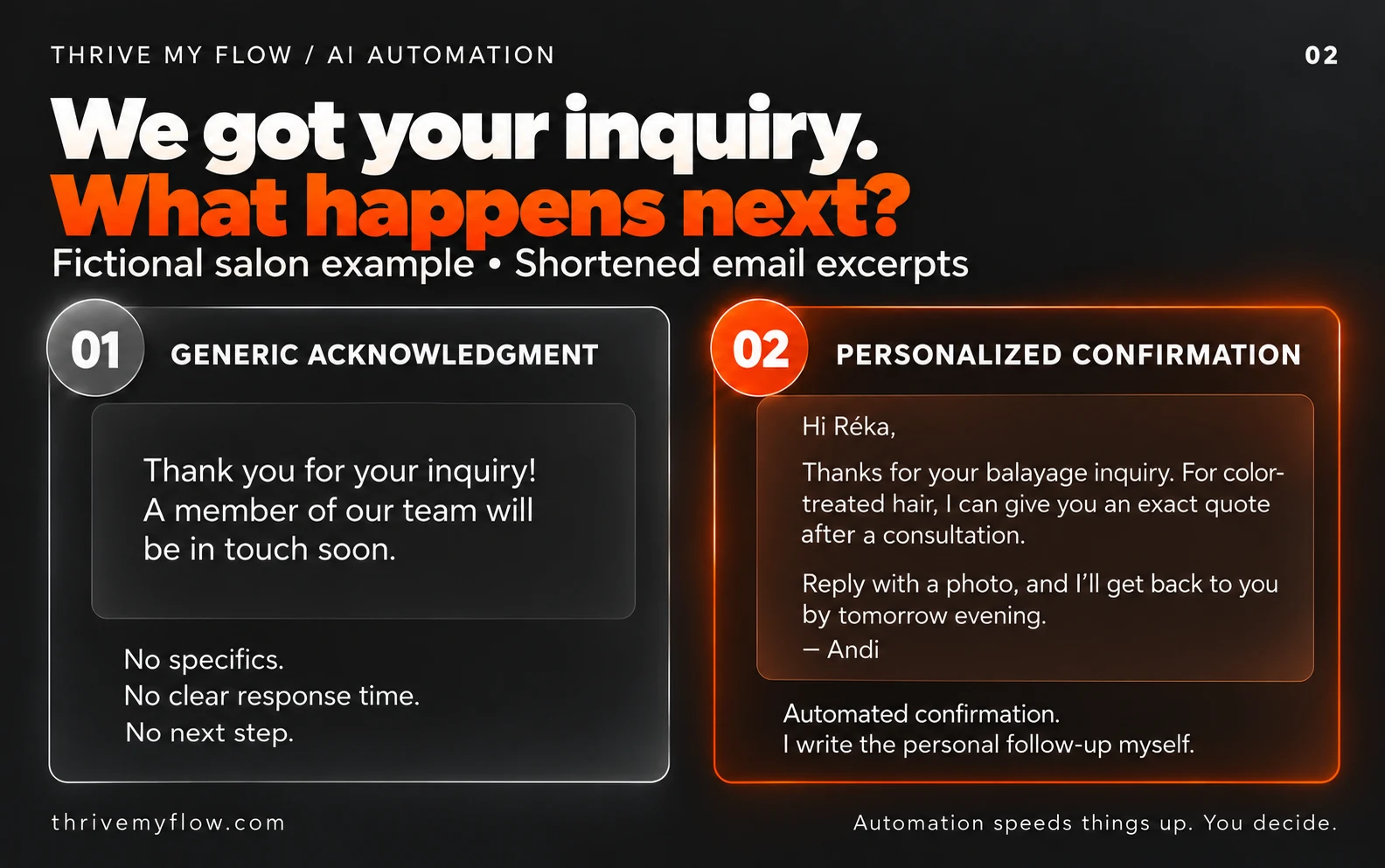
A made-up example from the form of a hairstylist who works alone. The person writes: “Hi! I’d like balayage on shoulder-length hair that’s been colored before. How long does it take and roughly how much is it?”
The bad version
“Thank you for your inquiry! A member of our team will contact you shortly.”
In a one-person salon, “a member of our team” sounds especially convincing. The email says nothing about the question, doesn’t say when a reply will come, and has no next step. That’s not handling an inquiry; it’s a receipt.
The good version
“Hi Réka! I got your question about balayage. Since your hair has been colored before, I can only give you an exact price and time once I see what condition it’s in. If you have a photo in natural light, just reply to this email and I’ll get back to you by tomorrow evening. If you’d like to look at appointments in the meantime, here are my open slots: [booking link]. Andi
This confirmation is sent automatically so you don’t have to wait. I write the personal reply myself.”
Why it works: it addresses her by name, responds to the specific detail (colored hair), explains why there’s no price yet, asks for one next step, and is upfront that it’s an automatic email. The “by tomorrow evening” deadline isn’t made up by the AI: you set it in the rules, and you have to keep it.
What automated inquiry handling doesn’t do
It doesn’t write quotes for you, and it doesn’t promise a price you haven’t approved. What it doesn’t know, it doesn’t make up: it passes it on to you. It doesn’t answer complaints, and it doesn’t decide for you who you take on. The decision and the personal reply stay yours; you just don’t have to write the first one at 10 p.m.
One limitation is worth saying out loud. AI models write wrong things in a confident voice too. That’s why it works within tight rules, and why it’s worth rereading every email it sends during the first few weeks. It’s the same split as in building websites: the machine speeds things up, the decisions stay human.
Five mistakes that make an automatic reply do more harm than good
- The email comes from a no-reply address. The person would reply, but they can’t. You’re blocking the very step you’re asking them to take.
- Email authentication isn’t set up. Since February 1, 2024, Google has required SPF or DKIM authentication on the sending domain from everyone who sends to Gmail. Without it, your carefully written confirmation can land in spam. You’ll find the setting in your hosting provider’s or email provider’s help pages.
- The AI gets free rein. Without a no-go list, sooner or later it will write a price or an appointment time you never said. Then you’re the one who has to explain.
- Too long and too eager. If the confirmation is longer than the person’s question, something went wrong. Three to five sentences are enough.
- You set it up and forget about it. A changed form field or an expired connection quietly stops the whole process. Every now and then, fill in your own form and see what arrives.
A sixth one that isn’t an automation mistake: if most inquiries just ask how much something costs, that’s a website problem. Put your prices on your site as text, not as an image, and half of those questions won’t even reach your form.
Data protection and AI transparency
Your form collects personal data: a name, an email address, often a phone number too. Both the automation platform and the AI service process it, so they need to be listed as processors in your privacy policy (GDPR Articles 13 and 28). In practice: check each provider’s data processing agreement (DPA) and where they store the data, and add them to your privacy policy.
Article 50 of the EU Artificial Intelligence Act (AI Act) has applied since August 2, 2026. It requires that people interacting directly with an AI system know they’re dealing with a machine, unless that’s obvious. According to the European Commission’s guidelines, whether a one-off confirmation email falls under this depends on several conditions, such as whether there’s a real two-way interaction. I wouldn’t wait for the answer: one sentence at the bottom of the email saying it was sent automatically costs nothing, and it’s fair.
This isn’t legal advice. If you’re unsure, have your privacy policy reviewed by a data protection professional.
Who automated inquiry handling is worth it for, and who it isn’t
It’s worth it if
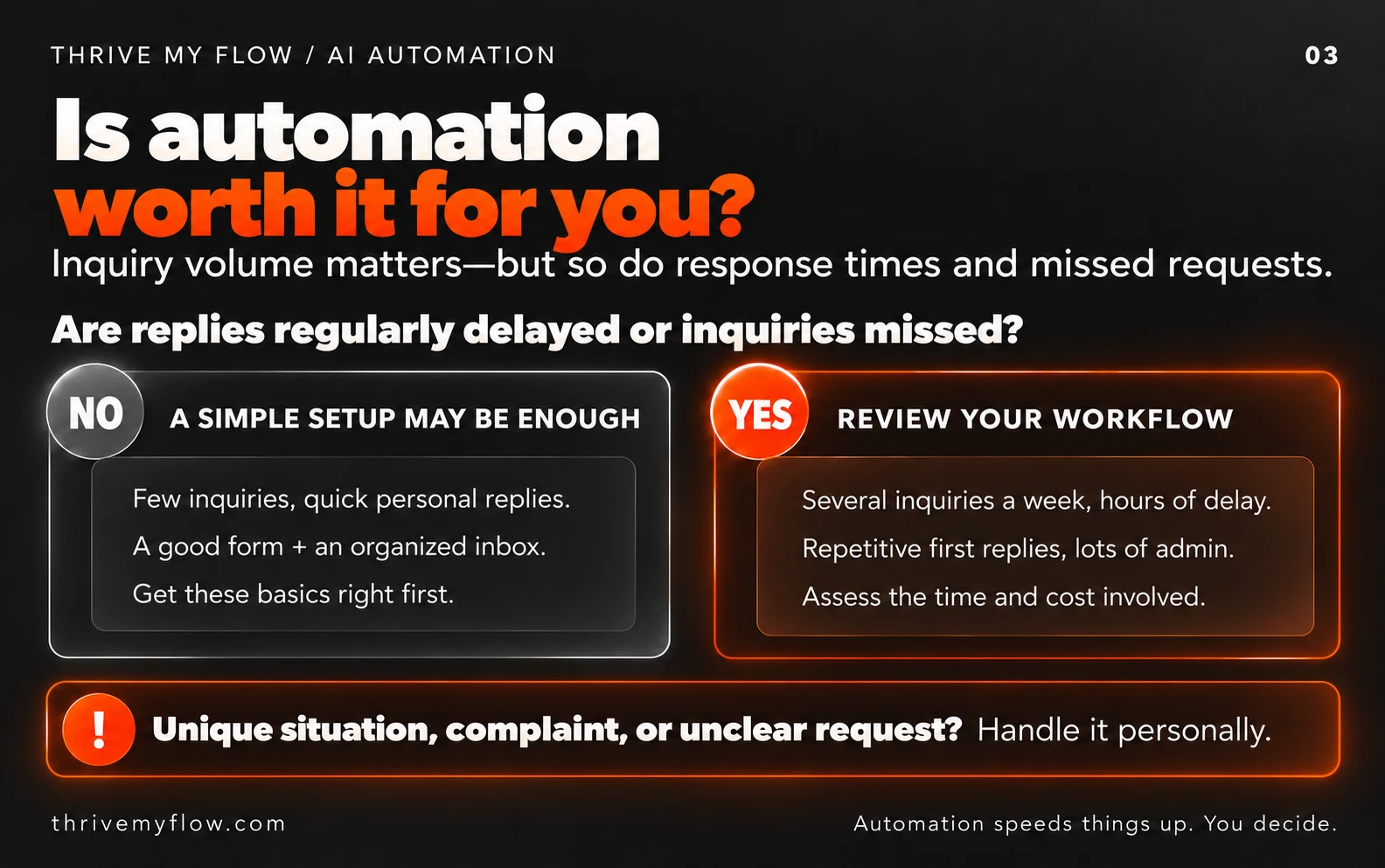
- you get several inquiries a week and it’s hard to keep track of which ones you’ve answered,
- you work with clients during the day and don’t check your email for hours,
- the people who contact you usually write to several places at once, and it matters who replies first,
- you’ve had a request simply get lost in your inbox before.
It isn’t worth it if
If you get one or two inquiries a month and can reply to each one personally and quickly, there’s nothing to automate. It’s also not worth it if every quote needs a long, one-on-one conversation from the very first minute. In that case, a well-written form and a friendly reply written by hand are worth more. And there’s no point automating a bad form either: if the fields don’t ask for what you need, you’ll just get the wrong questions faster.
What it costs
With me, inquiry handling is a one-off fee of HUF 90,000 (approx. €250), with no monthly fee, and you can add it to an existing website too. You pay the running costs of the external services (the automation platform and the AI service) directly to those providers. According to a September 2026 overview, Make’s free plan gives you 1,000 credits a month, and roughly every step uses one credit. Whether that’s enough for you depends on how many inquiries you get and how many steps the process has: it’s worth calculating with your own numbers before setting it up.
If you’d like someone to monitor and fine-tune it, that’s what the monthly AI operations maintenance is for. The Business and Premium packages already include one and three AI automations respectively. You’ll find the details on the Pricing page.
You can decide whether it’s worth it with one question: what is a client worth to you that you lose because someone else replied faster? With made-up numbers: if a new client comes four times in their first year at HUF 15,000 a visit, that’s HUF 60,000. If the module keeps two clients like that a year who would otherwise have gone elsewhere, the one-off fee has paid for itself in the first year. Run the numbers with your own prices, and if the result comes out below one client, don’t buy it.
What to do today, even without automation
- Fill in your own form from a different email address and see what the person gets. If it’s nothing, that’s the first thing to fix.
- Go through last month’s inquiries. How much time passed between each one arriving and your reply? If it went past 24 hours more than once, there’s something to gain.
- Write down the three most common questions you get through your form. They’ll be the basis of your reply rules, whether you automate or reply by hand.
- Check your Messenger and Instagram messages too. If people wait hours for a reply there as well, you can set up an automatic reply in an afternoon, no developer needed: automatic replies to messages.
Frequently asked questions
What is automated inquiry handling?
Automated inquiry handling is a background process behind a website form: the moment the form is submitted, it sends the person a personalized confirmation, saves the details to a spreadsheet and notifies the business owner. The owner still provides the quote and the price; the automation only takes over the first reply and the record keeping.
How quickly should you reply to an inquiry?
As soon as possible, ideally within an hour. According to a 2011 Harvard Business Review article, companies that responded within an hour were nearly seven times as likely to have a meaningful conversation as those that tried an hour later. If you don’t have time during the day, an instant confirmation at least shows the request arrived and when the personal reply will come.
Does the automatic reply give prices?
Only ones you’ve approved in advance and written into the rules, such as a published base price. It doesn’t promise custom prices, discounts or appointment times, because only you can state those responsibly. If the question is about price and there’s no rule for it, the reply says you’ll get back to them personally.
Do I have to say the reply was written by AI?
Since August 2, 2026, Article 50 of the AI Act has required that people interacting directly with an AI system know they’re dealing with a machine. Whether a confirmation email counts depends on several conditions. A short sentence at the bottom of the email saying it was sent automatically is recommended either way. This isn’t legal advice.
What do I need to add to my privacy policy?
The providers that process your form data: the automation platform, the AI service, the spreadsheet or CRM, and your email provider, as required by GDPR Articles 13 and 28. Check each one’s data processing agreement and where it stores data. If you’re unsure, ask a data protection professional to review it.
How much does it cost to run each month?
It depends on how many inquiries you get and which providers you choose. According to a September 2026 overview, Make’s free plan gives you 1,000 credits a month, and roughly every process step uses one credit. The AI service is billed at the provider’s current rates. Before setting it up, it’s worth calculating for your own monthly volume.
Does it work with an existing website?
Yes, if your form can send data to a webhook or an automation platform, which most WordPress form plugins can do. If your current form is just a single message field, it’s worth restructuring it first, because separate fields lead to more accurate replies.
What happens if the automation stops working?
The person doesn’t get a confirmation, so keep your form’s regular email notification on alongside the process; that way the request isn’t lost either way. Fill in your own form as a test every now and then. If you don’t want to deal with that, AI operations maintenance is there for exactly this.
Not sure which automation would make the biggest difference for you? I cover that in the free review too: I’ll send you a 10-minute video about your current website, and it’s yours to keep even if we never work together. Review my website
Sources
- Oldroyd, J. B., McElheran, K., Elkington, D.: The Short Life of Online Sales Leads. Harvard Business Review, March 2011. hbr.org
- Google: Email sender guidelines (requirements for all senders, from February 1, 2024). support.google.com
- Regulation (EU) 2024/1689 of the European Parliament and of the Council (AI Act), Article 50. eur-lex.europa.eu
- European Commission: guidelines on the transparency obligations under Article 50 of the AI Act, July 2026 (summary: Goodwin, August 2026). goodwinlaw.com
- Regulation (EU) 2016/679 of the European Parliament and of the Council (GDPR), Articles 13 and 28. eur-lex.europa.eu
- Jetadmin: Make.com Pricing in 2026 (prices checked September 26, 2026). jetadmin.io